Bandicam Version History
You can check out the complete update changelog below.
27.0.7 (Bandicam 2027 Download) 10/15/2026
- Fixed a bug where uploading to Vimeo failed
- Fixed a bug in stopping scheduled recordings
- Other minor changes
27.0.6 09/09/2026
- Added a built-in video and audio player
- Added built-in video and audio editing
- Added Smart Zoom based on cursor movement
- Added subtitle insertion with AI Transcription
- Added AI webcam background removal, blur, and replacement
- Added AI Transcription for subtitles and speaker separation
- Added AI highlight editing
- Added subtitle-based editing
- Added subtitle editing
- Added automatic editing of silence and filler words, with speaker selection
- Added AI subtitle translation
- Added AI video summaries with HTML export
- Added AI quizzes based on video content, with HTML export
- Added high-bitrate AAC audio support
- Added borders for webcam overlays
- Added rounded, circular, heart, and star webcam shapes
- Split the main window into Home and Settings tabs for better space efficiency
- Added previews for selected videos and images
- Added an option to save audio tracks as separate MP3 files
- Added key options for each recording mode to the Get Started screen
- Applied the skinned style to all menus
- Updated window corners to match the OS style
- Added blur effects for up to three areas of the recording screen
- Improved controls for Rectangle area and Fullscreen recording modes
- Improved registration and license management through My Bandicam Space
- Other minor changes
8.3.2 (Bandicam 2025 Download) 10/15/2026
- Fixed a bug where uploading to Vimeo failed
8.3.1 06/26/2026
- Bugs fixed
- Failure of specific command-line option combinations to work.
- Potential crash during Bandicam/Bandicut updates.
- Other minor bugs have been fixed.
8.3.0 12/30/2025
- Improved the hooking stability for Vulkan games.
- Bugs fixed
- Incorrect processing of webcam overlay alpha channel in Vulkan games.
- Recording stop failure in Vulkan games (addressed the DX12 hooking switch).
- Game crash when stopping Vulkan recording.
- Incorrect tooltip size on multiple monitors with different DPI settings.
- Other minor bugs have been fixed.
8.2.2 09/19/2025
- Reduced border flickering when resizing rectangles.
- Fixed BandiFix's failure to repair corrupted files in Bandicam 8.2.0 and 8.2.1.
8.2.1 08/30/2025
- Added an option to capture audio exclusively from a specific process.
- Adjusted the audio device capture buffer.
- The main window will be hidden when choosing 'Select a recording area.'
- Bugs fixed
- Fixed a multi-monitor DPI scaling bug.
- Fixed files not opening in Adobe Premiere & Vegas Pro in Bandicam 8.2.0.
- Other minor bugs have been fixed.
8.2.0 08/11/2025
- Added new webcam overlay styles: Rounded Rectangle and Rounded Square.
- Added the blur icon to the Fullscreen recording control bar.
- Enhanced 'Select a recording area' with auto-detection for web elements (e.g., auto-detecting YouTube video areas).
- Bugs fixed
- Videos failed to upload to WhatsApp/Facebook web.
- The NVENC HEVC codec (main/main10 profile) was not working properly.
- Other minor bugs have been fixed.
8.1.1 03/28/2025
- Improved translations for multiple languages.
- Improved error handling when all available devices disappeared from Windows sound settings during recording.
- Disabled the main window close button during recording.
- Changed the recording time interval from 0.5 seconds to 0.1 seconds.
- Bugs fixed
- Vimeo uploads were not working properly.
- Other minor bugs have been fixed.
8.1.0 01/21/2025
- Added the Auto-Pause Recording feature.
(Bandicam will automatically start/resume recording if a mouse or keyboard is in use.) - Bandicam now supports Rec. 709 (BT. 709) color space.
- Added color space selection option in the format settings window (Rec. 709 and Rec. 601).
- Added the "Cancel Recording" hotkey which allows users to stop and delete the recording file.
- Added support for more hotkeys in drawing mode (Whiteboard, Ellipse, Clear all).
- Magnifier size and scale has increased by 1.6x in Screen Recording Mode.
- Bandicam now only uses NVENC Video Codec SDK 12 (Video Codec SDK 8 is deprecated).
- Bugs fixed
- Videos recorded with the H264 (AMD VCE/VCN) codec were slow or did not work properly when played back.
- The 'Failed to start audio capture' error occurred when all speakers and microphone devices were turned off in Game Recording Mode.
- The Copy to Clipboard function didn't work properly.
- Other minor bugs have been fixed.
- Changelog ›
8.0.1 12/10/2024
- Reduced the delay that occurs when capturing images in Game Recording Mode, especially in PNG format.
- Bugs fixed
- Fixed a bug related to the licensing process.
- Fixed a bug related to the update notification window.
- An error occurred when the AV1 (NVIDIA NVENC) codec was used in version 8.0.0.
- Other minor bugs have been fixed.
8.0.0 11/18/2024
- Applied new UI design for Bandicam 2025.
- Increased the main window size and changed the skin.
- Added the shadow effect to the main window skin in Windows 11. - Added the blur effect to the 'Rectangle on a screen' recording mode.
- Added the ellipse/circle drawing function in drawing mode.
- Added the 'Clear All' button in drawing mode.
- Added the 'Whiteboard (Fill background)' button in drawing mode.
- Added the 'All display' option to record multiple monitors when Bandicam starts.
- Improved the sequence number to start from 1 when changing colors in drawing mode.
- Improved the drawing function to allow users to draw straight lines, squares, and perfect circles by holding down the Shift key.
- Bugs fixed
- The 'Failed to start audio capture' error occurred when all speakers and microphone devices were turned off.
- A memory leak occurred when using the NVIDIA NVENC encoder under certain conditions.
- Other minor bugs have been fixed.
- Changelog ›
7.2.1 (Bandicam 2024 Download) 10/15/2026
- Fixed a bug where uploading to Vimeo failed
7.2.0 01/05/2026
- Improved the hooking stability for Vulkan games.
- Bugs fixed
- Incorrect processing of webcam overlay alpha channel in Vulkan games.
- Recording stop failure in Vulkan games (addressed the DX12 hooking switch).
- Game crash when stopping Vulkan recording.
- Incorrect tooltip size on multiple monitors with different DPI settings.
- Other minor bugs have been fixed.
7.1.9 12/15/2025
- Bugs fixed
- Fixed codec initialization error with NVIDIA graphics driver 591.44.
- Other minor bugs have been fixed.
7.1.8 09/19/2025, 09/12/2025
- Bugs fixed
- Fixed a multi-monitor DPI scaling bug.
- Videos failed to upload to WhatsApp/Facebook web.
7.1.7 04/03/2025
- Improved error handling when all available devices disappeared from Windows sound settings during recording.
- Bugs fixed
- Vimeo uploads were not working properly.
- Other minor bugs have been fixed.
7.1.6 01/23/2025
- Bugs fixed
- The 'Failed to start audio capture' error occurred when all speakers and microphone devices were turned off.
- Videos recorded with the H264 (AMD VCE/VCN) codec were slow or did not work properly when played back..
- The Copy to Clipboard function didn't work properly.
- Other minor bugs have been fixed.
7.1.5 11/21/2024
- Bugs fixed
- A memory leak occurred when using the NVIDIA NVENC encoder under certain conditions.
- The update notification window popped up under certain conditions.
- Other minor bugs have been fixed.
7.1.4 09/02/2024
- Improved the compatibility with Windows N editions.
- Improved the error message display for Google Drive and YouTube.
- Other minor bugs have been fixed.
7.1.3 08/05/2024
- Improved the delay that occurs when starting recording in Game Recording Mode.
- Added the 24 value to the keyframe interval in video codec settings.
- Bugs fixed
- Failed to start Bandicam under certain conditions.
- There was a delay when switching between recording modes.
- The version information was displayed incorrectly in the Add/Remove programs list.
- Other minor bugs have been fixed.
7.1.2 07/02/2024
- Improved the pen/highlighter drawing performance in drawing mode.
- The AMD VCE/VCN encoder was not recognized on some graphics cards (AMD Radeon RX 7800 XT).
- Bugs fixed
- The "/screenshot" command line parameter didn't work under certain conditions.
- Other minor bugs have been fixed.
7.1.1 04/16/2024
- Added the video rotation feature in the webcam overlay menu.
- Added the video rotation feature in Device Recording Mode.
- You can now re-select the recording area by pressing the right mouse button while selecting the screen recording area.
- The maximum number of characters in the blocked process list has increased from 519 to 779 characters.
- Bugs fixed
- The hooking blocking process list could not be saved under certain conditions.
- Other minor bugs have been fixed.
- Changelog ›
7.1.0 02/19/2024
- Added the 'All display' option in the scheduled recording settings window.
- Added an option to exclude Bandicam windows in the recorded video.
- The Bandicam window size now automatically changes when moving according to the monitor DPI scaling.
- Bugs fixed
- The mouse clicks did not work where the keystroke overlay was displayed.
- The Default size option in the DPI scaling option was unchecked by default.
- Other minor bugs have been fixed.
- Changelog ›
7.0.2 12/22/2023
- Bugs fixed
- The webcam overlay screen wasn't shown in the recorded video under certain conditions from Bandicam 6.2.0 to Bandicam 7.0.1.
- The scheduled recording function didn't work under certain conditions in Bandicam 7.0.1.
- The scheduled recording list was not deleted properly under certain conditions in Bandicam 7.0.1
- Other minor bugs have been fixed.
7.0.1 11/14/2023
- Bandicam now supports the AV1 (NVIDIA NVENC) encoder.
- Bandicam now supports the AV1 (AMD VCE/VCN) encoder.
- Added the speaker and microphone volume control function in the main window.
- Added the output folder button (video, image, audio) in the main window.
- The maximum value of the scheduled recording has been changed from 100 to 1,000.
- Bugs fixed
- The beginning of the recorded video was frozen for a second in some codecs.
- 0KB files in the output folder couldn't be deleted.
- Other minor bugs have been fixed.
- Changelog ›
7.0.0 10/05/2023
- Added support for the 'Specific window' recording method.
- You can now record a selected window even if it is covered by another window. - Added the speaker and microphone device selection menu in the main window.
- Bugs fixed
- The Hotkeys tab under the Advanced options did not close when pressing the ESC key.
- The 'Hide main window during recording' option didn't work under certain conditions.
- The 'Start new recording' function for auto complete recording didn't work under certain conditions.
- Other minor bugs have been fixed.
- Changelog ›
6.2.4 07/14/2023
- Bugs fixed
- The microphone volume control didn't work properly in Bandicam 6.2.3 under certain conditions.
- The recording performance dropped when the UAC window popped up in Screen Recording Mode.
- The Bandicam settings weren't saved when the system restarted or shut down.
- Other minor bugs have been fixed.
6.2.3 07/05/2023
- Improved the screen capture stability when using the enhanced capture method 2.
- Improved the automatic selection of the enhanced capture method.
- Bugs fixed
- Microphone access was shown as On even though the microphone option was turned off.
- Other minor bugs have been fixed.
6.2.2 06/08/2023
- Added the "All display" option that allows users to record multiple monitors at the same time.
- Improved the capture selection method for Screen Recording Mode.
- The black screen issue with some OpenGL games has been resolved.
- Other minor bugs have been fixed.
- Changelog ›
6.2.1 05/26/2023
- Improved the screen recording performance in Windows 10 and 11.
- Improved the HDR monitor capture performance in Screen Recording Mode.
- Added the option to save files under a folder in date format (YYYY-MM-DD).
- Added hotkeys for selecting the recording target area (Ctrl+Shift+F).
- Added hotkeys for maximizing the webcam preview (Shift+Tab)
- Hotkeys are displayed in tooltips for record, pause, and image capture buttons.
- Other minor bugs have been fixed.
- Changelog ›
6.2.0 04/18/2023
- Added a Keystroke overlay function in Screen Recording Mode.
- Added a fullscreen toggle icon to the webcam preview window in Screen Recording Mode.
- Added a move icon to the webcam preview window in Screen Recording Mode.
- Added a hibernate option for Scheduled Recording.
- Improved the performance of blur effect and webcam overlay.
- Bugs fixed
- Pen/Highlighter-related bug in Drawing Mode has been fixed.
- The webcam preview screen no longer flickers when switching from Screen Recording Mode to Drawing Mode.
- The webcam overlay related bug in Device Recording Mode has been fixed.
- Other minor bugs have been fixed.
- Changelog ›
6.1.0 02/28/2023
- Bandicam now supports the AV1 (Intel Quick Sync Video) encoder.
- Added a button to select the last 10 settings in the custom size window in Screen Recording Mode.
- Added "Show a silent pop-up before stopping recording" option in the Auto Complete Recording window.
- The maximum value of the silent duration in the Auto Complete Recording window has been changed from 999 seconds to 99999 seconds.
- If the 'Documents' folder is linked to OneDrive, the 'Videos' folder will be used as the default output folder.
- Bandicam doesn't support Windows Vista anymore.
- Bugs fixed
- The recorded videos were too bright when capturing HDR monitors in Screen Recording Mode.
- Other minor bugs have been fixed.
- Changelog ›
6.0.6 12/28/2022
- Bugs fixed
- BandiFix didn't repair broken MP4 files properly from version 6.0.1 to version 6.0.5.
- Other minor bugs have been fixed.
6.0.5 12/21/2022
- You can now upload and share the recorded video to Google Drive directly.
- Your email address will be shown if you’ve checked the "Keep me logged in" option in the YouTube and Google Drive upload window.
- Improved the 10-minute time limit notification for free version users.
- Improved the license expiration and renewal information notification.
- Bugs fixed
- The DPI Scaling settings in the main menu were not displayed properly.
- Other minor bugs have been fixed.
- Changelog ›
6.0.4 10/15/2022
- Improved the recording performance of the H.264 (CPU) codec.
- Bugs fixed
- The recorded video had syncing problems when using the H264 (CPU) or MPEG-4 video codec.
- Other minor bugs have been fixed.
6.0.3 10/06/2022
- Bugs fixed
- The recorded video had syncing problems when using MP3 320 kbps with the AVI container.
- Other minor bugs have been fixed.
6.0.2 08/30/2022
- Reduced the intermittent noise when using AAC codec.
- Added a Hibernate option to the Auto Complete Recording function.
- Bandicam now uses Hybrid shutdown (a.k.a Fast startup) when shutting down.
- Bugs fixed
- Text overlays (recording time, CPU usage, etc.) were not updated under certain conditions.
- Other minor bugs have been fixed.
- Changelog ›
6.0.1 07/14/2022
- You can now cancel the recording countdown with the ESC hotkey.
- Bugs fixed
- Bandicam crashed when using a microphone on certain systems.
- The video and audio were cut off when saving a recording as an MP4 file in a network folder.
- The 'Always show control bar' option did not work when the 'Start Bandicam minimized to tray' option was checked.
- Other minor bugs have been fixed.
- Changelog ›
6.0.0 06/28/2022 | Video Guide
- Added support for "Audio-only" recording mode - MP3, WAV
- You can now mute the speaker and microphone while recording.
- You can now adjust the transparency of the mouse highlight effect.
- The minimum value of the silent duration in the Auto Complete Recording window has been changed from 10 seconds to 3 seconds.
- The maximum number of simultaneous video uploads is limited to 5.
- Bugs fixed
- The Push-to-Talk function didn't work properly under certain conditions.
- The full screen recording control bar appeared when changing the recording mode under certain conditions.
- Other minor bugs have been fixed.
- Changelog ›
5.4.3 04/18/2022
- Bugs fixed
- The 'Start Bandicam minimized to tray' option did not work when the 'Hide main window during recording' option was checked.
- Other minor bugs have been fixed.
5.4.2 04/12/2022
- Bugs fixed
- The Vimeo upload function didn't work properly.
- The volume meter in the device recording window did not work under certain conditions.
- Other minor bugs have been fixed.
5.4.1 03/29/2022 | Video Guide
- You can now change the Webcam PIP border shape (square, circle, or ellipse).
- You can now set the countdown timer (1~10 seconds).
- Added an option to hide the main window in screen recording mode.
- Changed the webcam PiP status display UI in the main window.
- Bugs fixed
- The recording time was not updated in drawing mode when the “rectangle on a screen” mode was used.
- Speaker/microphone recording setting status was displayed incorrectly in the main window.
- Other minor bugs have been fixed.
- Changelog ›
5.4.0 02/08/2022, 02/10/2022
- Added the control bar move up/down button on the rectangle window
- Added the Hotkeys tab under the Advanced options menu.
- Bugs fixed
- The video resolution was changed when the height was longer than the width (such as 1440 x 2560).
- The preview status of the webcam changed to red even if the webcam did not open.
- Other minor bugs have been fixed.
- More changelog ›
5.3.3 12/02/2021, 12/06/2021
- Improved the hooking compatibility with DirectX 12 games.
- DirectX 12 games: Assassin's Creed Valhalla, Control, Far Cry 6, Halo Infinite, Horizon Zero Dawn, Resident Evil Village/2/3, Watch Dogs: Legion, etc. - Improved the hooking compatibility with BlueStacks.
- Bugs fixed
- An error occurred while accessing hosts file under certain conditions.
- Bandicam crashed when the 'Save as original format' option of PCM was checked.
- Other minor bugs have been fixed.
5.3.2 11/23/2021
- Bandicam can now display the date, time, elapsed time, and video resolution on the recorded video.
- Bandicam can now display the system information (CPU, MEMORY, etc.) on the recorded video.
- Improved the text overlay performance.
- Added the volume meter to the rectangle window and device recording window.
- Bugs fixed
- The recorded video had syncing problems when using MP3 audio codec from version 4.1.1
- The recording stopped when the default audio device was changed while recording.
- The volume meter did not work when the default audio device was changed while recording.
- The Intel QuickSync recommendation window did not appear on high-resolution monitors.
- Other minor bugs have been fixed.
- More changelog ›
5.3.1 09/15/2021
- Bugs fixed
- The profile for the NVENC HEVC codec was always set to Main444 regardless of the setting.
- Bandicam crashed when clicking the external video codec while the Logitech Video (I420) codec was installed.
- Other minor bugs have been fixed.
5.3.0 09/07/2021
- Bandicam now runs as a standard user by default.
- Bandicam now provides a profile for the NVENC HEVC codec (Main10, Main444, and Main444 Lossless Profile).
- The position of the game recording mode button has been changed.
- Added the 'bdcam_admin.exe' shortcut, which allows users to run Bandicam as an administrator.
- Improved the DirectX 12 hooking compatibility
- Other minor bugs have been fixed.
- More changelog ›
5.2.1 07/27/2021
- The recently used size and position will be stored in the 'Recently used size' menu when the image capture function is used.
- Bandicam now maintains the previous video codec setting when selecting MP4 or AVI in the format settings window.
- Bugs fixed
- Failed to run bdcam_nonadmin.exe if VCRUNTIME140.dll was not in the system folder.
- The AVI external codec (VFW) did not work properly in version 5.2.0
- Other minor bugs have been fixed.
- More changelog ›
5.2.0 07/13/2021
- Bandicam now works only on 64-bit Windows.
- Improved the program loading speed.
- Improved the screen recording performance.
- Improved the webcam recording performance.
- Added the sorting function at the scheduled recording list.
- Improved the license registration for non-admin users (standard users).
- Bandicam now maintains the previous audio codec setting when selecting MP4 or AVI in the format settings window.
- Other minor bugs have been fixed.
- More changelog ›
5.1.1 06/01/2021
- Added the update notification and download function.
- Added support for a microphone noise suppression filter in Game Recording Mode.
- Improved the noise suppression filter (Automatically adjusts the threshold according to the microphone volume).
- Improved the power saving mode compatibility.
- Added a 9:16 aspect ratio (608x1080, 720x1280) on the rectangle window.
- Bandicam now hides the drawing tool when hiding the rectangle window using the 'Show/Hide (Ctrl+Alt+H)' function.
- Bugs fixed
- The drawing mode didn’t work properly under certain conditions.
- The mouse goes out of the window and continues to be drawn even without clicking the mouse under certain conditions.
- Other minor bugs have been fixed.
- More changelog ›
5.1.0 03/23/2021
- The .mp3 codec is now available with an .MP4 file type.
- Improved the audio stuttering issue.
- Added auto recording and scheduled recording tips link.
- Added command line parameters (/start, /screenshot, /pause, /unpause)
- Improved security of Bandicam related to DLL Hijacking.
- Improved the compatibility with OBS VirtualCAM in Device Recording Mode.
- Bugs fixed
- The size of the rectangle window was displayed incorrectly if the recording size was changed after using the 'Show/Hide (Ctrl+Alt+H)' option.
- Bandicut could not be installed from within Bandicam.
- Other minor bugs have been fixed.
- More changelog ›
5.0.2 02/16/2021
- The recording control bar is now able to be moved to another position in full screen recording mode.
- A 10-minute time limit notification is now displayed for free version users.
- The 10-minute time limit will be removed if you register the license while recording in Device/Screen Recording Mode.
- The rectangle window is now displayed if the recording size is changed after using the 'Show/Hide (Ctrl+Alt+H)' option.
- The 'Start new recording' option is not available at the 'Auto Complete Recording' window in the free version.
- Bugs fixed
- The speakers/microphone volume meters did not move when the 'Start full-screen recording on Bandicam startup' option was used.
- The webcam preview function didn't work when Bandicam was minimized.
- Bandicam had a problem when running two or multiple instances of Bandicam.
- Other minor bugs have been fixed.
- More changelog ›
5.0.1 12/24/2020
- Updated the underlying code of the speakers/microphone volume meters
(The volume meter of the recording device is maintained even if the sound device is changed.) - Bugs fixed
- Pen/Highlighter related bug in drawing mode has been fixed.
- Other minor bugs have been fixed.
5.0.0 12/17/2020
- Applied new UI design for Bandicam 5.0.
- Displayed speakers/microphone volume meters separately.
- Added the text overlay button to the main UI.
- The speakers/microphone volume meter always operates regardless of the recording status.
- The recording time is displayed only when recording.
- The recording target display can now be changed while recording in full screen recording mode.
- Added the display selection menu to the control bar in full screen recording mode.
- Added the "Always hide control bar" option to the Fullscreen display selection menu.
- Added the "Keep me logged in" option to stay signed into a YouTube account.
- YouTube login method has changed.
- Bugs fixed
- Pen/Highlighter related bug in drawing mode has been fixed.
- The preview function related to the text overlay settings has been fixed.
- The 'Copy to Clipboard' function did not work in Screen Recording Mode under certain conditions.
- Other minor bugs have been fixed.
- More changelog ›
4.6.5 11/12/2020
- Added a microphone noise suppression filter.
- Added a sound level meter in the sound recording settings.
- Added support for the Nv12 pixel format in Device Recording Mode.
- The sound device list is now updated in real-time when the device is added or removed.
- The FPS menu is now shown only in Game Recording Mode.
- Bugs fixed
- The recording area changed when trying to change the recording mode during recording and cancelling it.
- Fixed UI bug related to the screen recording window.
- Other minor bugs have been fixed.
- More changelog ›
4.6.4 09/23/2020
- Bugs fixed
- The Primary Sound Device (Speakers) was changed from "Disable" to "(Default Output Device)" when Bandicam restarted.
- The computer screen was recorded in the wrong position when using the rectangle screen recording mode under certain conditions.
- Other minor bugs have been fixed.
4.6.3 09/17/2020
- Improved the sound device selection UI.
(The Primary Sound Device is split into speakers and microphone.) - Improved the pen/highlighter drawing performance in drawing mode.
- Bugs fixed
- Bandicam could not run in Windows Vista from version 4.6.1
- Other minor bugs have been fixed.
- More changelog ›
4.6.2 08/07/2020
- Improved the stability of the Intel Quick Sync Video encoder.
(Bandicam had an audio/video sync issue or stopped working when using the Intel Quick Sync Video encoder on some computers.) - The recording control bar in full screen mode will be hidden immediately when the recording is started.
- The recording control bar in full screen mode will be shown when the recording is paused.
- Improved the 'Select a recording area' function in Screen Recording Mode.
- Added the "Always show control bar" option to the Fullscreen display selection menu.
- Deleted the 480x268 and 480x360 options in the Rectangle on a screen selection menu.
- Bugs fixed
- The mouse click sound effects didn't work in the mouse effect preview window under certain circumstances.
- Afterimages were played in the recorded video when the chroma key preview function was used.
- The 'Failed to initialize codec' error occurred when 192x128 or smaller resolution was selected and the AMD VCE/VCN HEVC encoder was used.
- Other minor bugs have been fixed.
- More changelog ›
4.6.1 07/09/2020
- Bandicam now supports the AMD VCE/VCN HEVC encoder.
- Updated the Intel Quick Sync Video encoder.
- Improved the stability of the HEVC encoder.
- Improved the Vulkan hooking compatibility.
- Bugs fixed
- Undo/Redo of the eraser function didn't work properly in Screen Recording Mode.
- Multiple command line parameters didn't work properly. E.g.) bdcam.exe /nosplash /record
- Other minor bugs have been fixed.
- More changelog ›
4.6.0 06/17/2020
- License management has been updated.
- Improved the license management protocol.
- Displayed the license count and annual license expiration date.
- Added a function to open the help page if the license registration failed.
- Added a function to open the download page if Bandicam needs reinstalling.
- Bugs fixed
- Failed to launch certain Vulkan games when Bandicam was installed.
- Failed to create file when a certain special character was included at the scheduled recording.
- The OK button in the "No sound capture devices" message did not work.
- The magnifier function didn't work properly while selecting the recording area under certain conditions.
- The drawing tool window was displayed even if the recording mode was not selected.
- Other minor bugs have been fixed.
- More changelog ›
4.5.8 04/08/2020
- Added support for more hotkeys in drawing mode (Ctrl+Alt+1,2,3,4,5,6,7,8,9)
- Added /record, /stop, /shutdown commands for bdcam_nonadmin.exe
- Bugs fixed
- The mouse cursor in drawing mode wasn't recorded on some tablets (Wacom, etc.)
- The mouse cursor was displayed in the wrong position on some tablets (Wacom, etc.)
- Other minor bugs have been fixed.
4.5.7 03/19/2020
- Improved the audio/video synchronization.
- Improved the mouse click effect and the mouse highlight effect.
- Reduced the shutter sound when capturing images.
- The full-screen recording menu bar will not be shown when starting if the 'Start Bandicam minimized to tray' option is checked.
- Bugs fixed
- The Keyframe interval function of the H264 (Intel Quick Sync Video) encoder didn't work properly.
- The 'Failed to create file' error occurred when the 'Start full-screen recording on Bandicam startup' option was checked and the output folder was set to a NAS storage folder.
- The output folder could not be set in Windows 7 or earlier.
- Other minor bugs have been fixed.
4.5.6 02/20/2020, 03/03/2020
- Improved the screen capture performance when using the enhanced capture method.
- Improved the screen shaking issue when using the around mouse screen recording mode.
- Less of the red-colored rectangle window will be recorded than before when using the enhanced capture method.
- Improved security of Bandicam installer.
- Updated End User License Agreement.
- Bugs fixed
- The mouse cursor and mouse click effects were displayed in the wrong position after resizing the rectangle window.
- Other minor bugs have been fixed.
- More changelog ›
4.5.5 01/21/2020
- Bandicam now maintains the aspect ratio when resizing the rectangle window (while holding the Shift key or recording).
- The maximum FPS has been changed from 144 to 1000.
- Bugs fixed
- The rectangle window was displayed in the wrong position in Windows 7 (DPI Aware bug).
- Other minor bugs have been fixed.
- More changelog ›
4.5.4 01/06/2020
- Bandicam now supports the AMD VCN encoder (AMD Radeon RX 5700 XT, etc.)
- Bandicam now supports DPI Aware Per Monitor V2 (Applied to dialog and menu)
- Added /reg command line for bdcam_nonadmin.exe
- Bugs fixed
- The H.264 (Intel Quick Sync Video) encoder didn't work on some computers.
- Other minor bugs have been fixed.
- More changelog ›
4.5.3 12/11/2019
- Improved the recording performance of the H.264 (CPU) codec.
- The splash screen will be resized automatically relative to the screen resolution.
- Bugs fixed
- The mouse cursor was invisible on Bandicam UI when the 'Select a recording area' function was used.
- CPU usage increased when the recording was paused in 'Screen Recording' mode.
- The PNG file size was very large because it was not compressed.
- Other minor bugs have been fixed.
4.5.2 11/14/2019
- Improved the recording performance and stability of the H.264 (CPU) codec.
- Bugs fixed
- The recorded video was upside down on some computers when the Nvidia NVENC codec was used in Screen Recording Mode.
- The 'Around mouse' full-screen recording mode didn't work properly on multiple monitors.
- The Vietnamese language file was corrupted.
- Other minor bugs have been fixed.
4.5.1 11/12/2019
- Improved the recording performance of the H.264 (Intel Quick Sync Video) codec.
- Improved the recording performance of the MJPEG codec.
- Improved the screen capture performance when using the enhanced capture method.
- Bugs fixed
- Files which were already opened in another media player were recognized as damaged files when trying to play them under the [Home]-> [Videos] tab.
- Bandicam crashed when the webcam preview hotkey was pressed repeatedly in 'Screen Recording Mode' in certain situations.
- The webcam preview function didn't work properly in 'Screen Recording Mode' in certain situations.
- Other minor bugs have been fixed.
- More changelog ›
4.5.0 10/23/2019
- Bandifix can now fix a corrupt MP4 file that have undergone an abnormal termination while recording.
- Improved Bandicam startup loading speed.
- Improved Bandifix skin and UI.
- Improved the hooking stability.
- Font size and line thickness are adjusted automatically in drawing mode according to DPI.
- The UI bug related to unregistering a license has been fixed.
- Other minor bugs have been fixed.
- More changelog ›
4.4.3 07/23/2019
- Added the "Unregister" button to remove the registration information.
- Added the "Rename" function on the context menu to the Home tab.
- Changed the maximum size of the mouse cursor, click effect, and highlight effect from 200% to 300%.
- Improved highlight effect method (The boundary line has become smoother)
- Other minor bugs have been fixed.
- More changelog ›
4.4.2 06/20/2019
- Added the silent duration option to the Auto Complete Recording function.
(If there is no computer sound for xx seconds, the recording will stop automatically.) - The maximum bitrate for CBR has been changed from 100Mbps to 120Mbps.
- The Bandicam window which is minimized to the system tray will appear by double clicking on the application icon.
- Bugs fixed
- The recorded video had no sound in Screen Recording Mode if a user clicked the "Mute" button in Device Recording Mode.
- The recorded video was corrupted if the computer went into sleep mode while recording.
- Other minor bugs have been fixed.
- More changelog ›
4.4.1 05/08/2019
- The recording won't stop automatically even if the monitor resolution has changed in Screen Recording Mode.
- If the output folder doesn't exist, the corresponding error message is displayed.
- Improved the DirectX hooking compatibility.
- Bugs fixed
- Failed to recognize some DirectX 12 games (Tekken 7, etc.)
- Failed to recognize Microsoft Store games even if the "Windows Store Apps (UWP)" option was checked.
- The 'Around mouse' screen recording mode didn't work properly on multiple monitors with different resolutions.
- Bandicam stopped working when the sound setting button was pressed under certain conditions.
- Other minor bugs have been fixed.
- More changelog ›
4.4.0 04/10/2019
- Added support for the text overlay feature.
- Added support for Pen Tablet input in drawing mode.
- Added a warning message if a sound capture device is not available.
- Bandicam now records the video even if a sound capture device is not available.
- Bugs fixed
- Windows Media Player in Windows 7 and 8 couldn't play videos created with the H.264 (CPU) codec of Bandicam.
- The rectangle window was moved inside of the monitor instead of the specified area under certain conditions.
- The rectangle window was displayed in the wrong position under certain conditions.
- Failed to open the device in Device Recording Mode if there was no audio device under the Playback tab in Windows sound settings.
- An image was captured when a user pressed the right Alt+C keys on some computer keyboards.
- Other minor bugs have been fixed.
- More changelog ›
4.3.4 02/19/2019
- Added support for resizing the 'Scheduled Recording List' window.
- The schedule date is no longer displayed on the daily/weekly recording setting menu. (Only the time is displayed.)
- Bugs fixed
- The scheduled recording time could be duplicated under certain conditions.
- The scheduled recording function didn't work under certain conditions when a daily/weekly scheduled recording was set.
- The [Help] link font at the 'Scheduled Recording List' window was displayed incorrectly.
- The rectangle window was displayed in the wrong position under certain conditions.
- Other minor bugs have been fixed.
4.3.3 02/14/2019
- Removed the Facebook upload button.
- Bugs fixed
- The 'This application is invalid' error occurred when Bandicam starts under certain conditions.
- The scheduled recording function didn't work properly when a daily/weekly scheduled recording was set.
- Other minor bugs have been fixed.
4.3.2 02/13/2019
- Bugs fixed
- The recording stopped automatically at midnight when a daily/weekly scheduled recording was set.
- The AMD VCE H.264 codec was not recognized under certain conditions.
- A strange error message was displayed when there was no HDMI/Webcam device in Device Recording Mode.
- A memory leak occurred when closing Bandicam in Around Mouse recording mode.
- The 'Run Bandicam on Windows startup' option didn't work after reinstalling Bandicam.
- Other minor bugs have been fixed.
4.3.1 01/22/2019
- Bandicam now supports the Elgato capture card.
- Added the 'Use custom audio device' option in Device Recording Mode.
- Added the Show countdown timer
 option in Screen Recording Mode.
 - Bugs fixed
- The cursor mode didn't work properly when the screen was covered by boxes, arrows or lines.
- A tearing issue occurred frequently when the 'Use enhanced capture method' option was used under certain conditions.
- The UI bug in the drawing tool window has been fixed.
- Other minor bugs have been fixed.
- More changelog ›

4.3.0 12/10/2018
- Added the scheduled recording function. (You can automatically start recording at a specific time on a daily/weekly schedule.)
- Added video upload options for Vimeo: Unlisted, Password.
- Added the H.264 (CPU) codec suggestion message if the hardware-accelerated encoder is not available.
- Bugs fixed
- The size of the mouse cursor wasn't changed properly when the video resolution was changed.
- Displayed Red FPS number in a certain OpenGL game - RuneScape
- Other minor bugs have been fixed.
- More changelog ›
4.2.1 10/18/2018
- Bandicam now supports Chroma Key (green screen) for webcam overlay.
- Improved the webcam overlay UI.
- Improved the repeat screen capture setting UI.
- Removed the Facebook upload function.
- Bugs fixed
- The 'Failed to initialize codec' error occurred when the constant bitrate (CBR) value was set over 60,000kbps with the H.264(CPU) codec.
- Some skin images were broken when the DPI Scaling option was used.
- Other minor bugs have been fixed.
- More changelog ›
4.2.0 08/16/2018
- Added the recording area selection function (Improved the 'Find window' function.)
- Added a magnifier function when adjusting the size of the rectangle window.
- Added the 'Select a recording area' option in Screen Recording Mode.
- Added the 'Upgrade Registration' button to update the license information.
- The maximum time interval of the repeat screen capture function has been changed from 999 seconds to 9999 seconds.
- Bugs fixed
- The Flip screen (Vertical) function of the device recording mode did not work properly.
- Other minor bugs have been fixed.
- More changelog ›
4.1.7 07/09/2018
- Bugs fixed
- Failed to take a screenshot in Device Recording Mode.
- Other minor bugs have been fixed.
4.1.6 07/05/2018
- The Find Window function in the rectangle window can be canceled by pressing the ESC key.
- Bugs fixed
- Several hotkeys in the 'Rectangle on a screen' menu didn't work.
- Other minor bugs have been fixed.
4.1.5 07/03/2018
- Bandicam is now able to copy a screenshot to the clipboard with a hotkey (Ctrl+C or Ctrl+Alt+C).
- The maximum video resolution for AMD VCE H.264 encoder has been changed from 1920x1080 to 4096x2160.
- The term of the hardware-accelerated encoder for AMD has been changed from "AMD APP" to "AMD VCE".
- Improved Bandicam execution speed.
- Bandicam now displays an error message if the 'Set timer for Auto Start Recording' option is checked while the recording mode is not selected.
- The drawing tool now moves together with the rectangle window.
- Bugs fixed
- The cursor tool in drawing mode didn't work in the full screen recording mode.
- Other minor bugs have been fixed.
- More changelog ›
4.1.4 06/07/2018
- Added the cursor button in drawing mode which allows users to click the mouse cursor without drawing.
- Added command line interface (/record, /stop, /shutdown, /nosplash, /safemode, /reg).
- Bandicam now supports Vulkan 1.1 in Game Recording Mode.
- Added the full-screen option in the Around Mouse recording mode.
- Improved the Output folder selection UI.
- The size selection menu in the Rectangle recording mode has changed (854x480 -> 848x480, 480x270 -> 480x268).
- Other minor bugs have been fixed.
- More changelog ›
4.1.3 04/19/2018
- Added support for line drawing in drawing mode.
- Added support for drawing a straight/horizontal/diagonal line and square with the Shift key.
- Added a button to install and run Bandicut.
- Improved AMD APP H.264 codec recognition of AMD Radeon Pro series.
- The default audio codec of AVI has been changed from MP2 to MP3.
- Bugs fixed
- The "Always on top option" on the rectangle window didn't work if the "Add webcam overlay" option was checked.
- Sequence number in drawing mode didn't work properly when undo/redo was executed.
- Bandicam stopped working when changing the video resolution under certain circumstances.
- Failed to initialize the NVENC H.264 lossless encoder while using the CBR option under certain circumstances.
- Bandicam stopped working when the video resolution of the Around Mouse recording mode was larger than the monitor resolution.
- Other minor bugs have been fixed.
- More changelog ›
4.1.2 03/14/2018
- Bandicam now provides a profile for the NVENC H.264 codec.
- Bandicam now supports the lossless video encoding of the NVENC H.264 codec (Lossless H264, High 4:4:4 profile).
- Added the 'bdcam_safemode' shortcut to start Bandicam in Safe Mode.
- Added an option to flip the screen horizontally/vertically in the webcam overlay menu.
- Added an option to flip the screen horizontally/vertically in Device Recording Mode.
- Improved the recording performance of the H.264 (CPU) codec.
- Bandicam version and encoder type information will be added to the recorded video.
- Bugs fixed
- Bandicam crashed when the record hotkey was pressed if the recording mode was not selected.
- Failed to initialize video capture device under certain conditions.
- The Non-Admin mode of Bandicam (bdcam_nonadmin.exe) didn't work on some computers.
- Other minor bugs have been fixed.
- More changelog ›
4.1.1 01/30/2018
- The .mp3 codec is available with an .AVI file type.
- Added an option, "Play mouse click sounds while recording".
- Added an option, "Play sound effects when the recording starts or stops".
- Bugs fixed
- The webcam preview showed a black screen while recording in some games (Rage, etc.).
- The HDYC colorspace input couldn't record in Device Recording Mode.
- A memory leak occurred when hooking DirectX 11 games/applications in Game Recording Mode.
- Bandicam stopped working when changing the display settings (resolution, main monitor) in 'Screen Recording Mode.
- Other minor bugs have been fixed.
- More changelog ›
4.1.0 12/21/2017
- The webcam preview function is now available in Screen Recording Mode.
- The webcam preview function is now available in Device Recording Mode.
- Added support for resizing the mouse cursor, the mouse click effect and the mouse highlight effect.
- Added support for the preview of the mouse effect settings.
- Bugs fixed
- The recorded video was garbled when the 'Prefer RGB colorspace' option was used for the External codec.
- The 'Run Bandicam on Windows startup' option didn't work in Non-Admin mode of Bandicam (bdcam_nonadmin.exe).
- Other minor bugs have been fixed.
- More changelog ›
4.0.2 11/21/2017
- Bandicam is now able to add a logo to the captured images.
- Bandicam is now able to set the quality of JPEGs.
- Improved the webcam preview UI in the webcam overlay menu.
- Added support for the "HDYC colorspace" in Device Recording Mode.
- Bugs fixed
- Bandicam did not terminate automatically while Windows was shutting down after the Windows 10 Fall Creators update.
- Other minor bugs have been fixed.
- More changelog ›
4.0.1 09/29/2017
- Added the Facebook upload function. (How to upload a video to Facebook.)
- Fullscreen mode: Added the pin icon to show/hide the recording control bar.
- Fullscreen mode: Added the opacity adjustment function.
- Fullscreen mode: Bandicam now shows the display number in the recording information status line.
- Added the Khmer(Cambodian) language file by touch sovannara.
- Bugs fixed
- The taskbar was not recorded when using the around mouse screen recording mode.
- Other minor bugs have been fixed.
- More changelog ›
4.0.0 08/23/2017
- Applied new UI design for Bandicam 4.0.
- Added support for the "new Fullscreen" recording mode.
- Added support for the "Around Mouse" recording mode.
- Added the 'bdcam_nonadmin.exe' file which allows non-admin users (standard users) to use Bandicam without administrator privileges.
- Added support for text input in the drawing function.
- Added the "Get Started" menu for beginners.
- Added the Belarusian, Burmese language files.
- The mouse cursor/effect settings status is displayed on the main window.
- The microphone settings status is displayed on the main window.
- Improved the switching speed to Game Recording Mode.
- The maximum length of the format/size preset name is limited to 100 characters.
- The DPI scaling of the rectangle window and device recording window is adjusted automatically according to Bandicam's main window.
- Bugs fixed
- The bdcam64.bin process remained after crashing.
- The record button was not active after the Auto Complete Recording function was used.
- A file dragging bug of the video/image file list has been fixed.
- Other minor bugs have been fixed.
- More changelog ›
3.4.4 07/17/2017
- Improved the hooking stability of DirectX 12 games (Tom Clancy's The Division).
- Bugs fixed
- Failed to start recording or take a screenshot on some computers.
- Other minor bugs have been fixed.
3.4.3 07/14/2017
- Improved AMD APP H.264 codec recognition of AMD RX 460/470/480.
- Bugs fixed
- The YouTube upload function didn't work properly on some computers.
- Other minor bugs have been fixed.
3.4.2 05/26/2017
- Bugs fixed
- The webcam preview was upside down in Game Recording Mode with some webcam devices.
- Other minor bugs have been fixed.
3.4.1 05/25/2017
- Improved the stability of the Intel Quick Sync Video encoder.
- Improved the recording performance of the webcam overlay.
- Bandicam is now able to save a webcam overlay video in 60FPS (while saving the webcam overlay video as a separate file).
- The default recording time for Auto Complete Recording has changed from 10 minutes to 60 minutes.
- The default rectangle size for screen recording has changed from 640x480 to 1280x720.
- Bugs fixed
- Failed to use the webcam recording function while ESET AntiVirus was running.
- The input format of a specific webcam device wasn't applied to the webcam overlay function.
- The Drawing mode menu was disabled while not recording.
- Other minor bugs have been fixed.
- More changelog ›
3.4.0 04/26/2017
- Bandicam is now able to add numbers to highlight steps of video tutorials.
- Bandicam is now able to draw arrows with customized colors and sizes.
- Improved the real-time drawing function.
- The real-time drawing feature can be used in a moving video.
- Added a new size preset (1920x1080) on the rectangle window.
- Separated the FPS position hotkey and the FPS show/hide hotkey.
- Improved the writing efficiency of PCM audio data with the .avi container.
- Bugs fixed
- RGB24 codec resulted in quality loss in the registered version.
- External codec which supports RGB input such as MagicYUV, Lagarith, x264 resulted in quality loss.
- Bandicam crashed when the smallest size was selected and the H264(CPU) codec was used in Screen Recording Mode.
- Other minor bugs have been fixed.
- More changelog ›
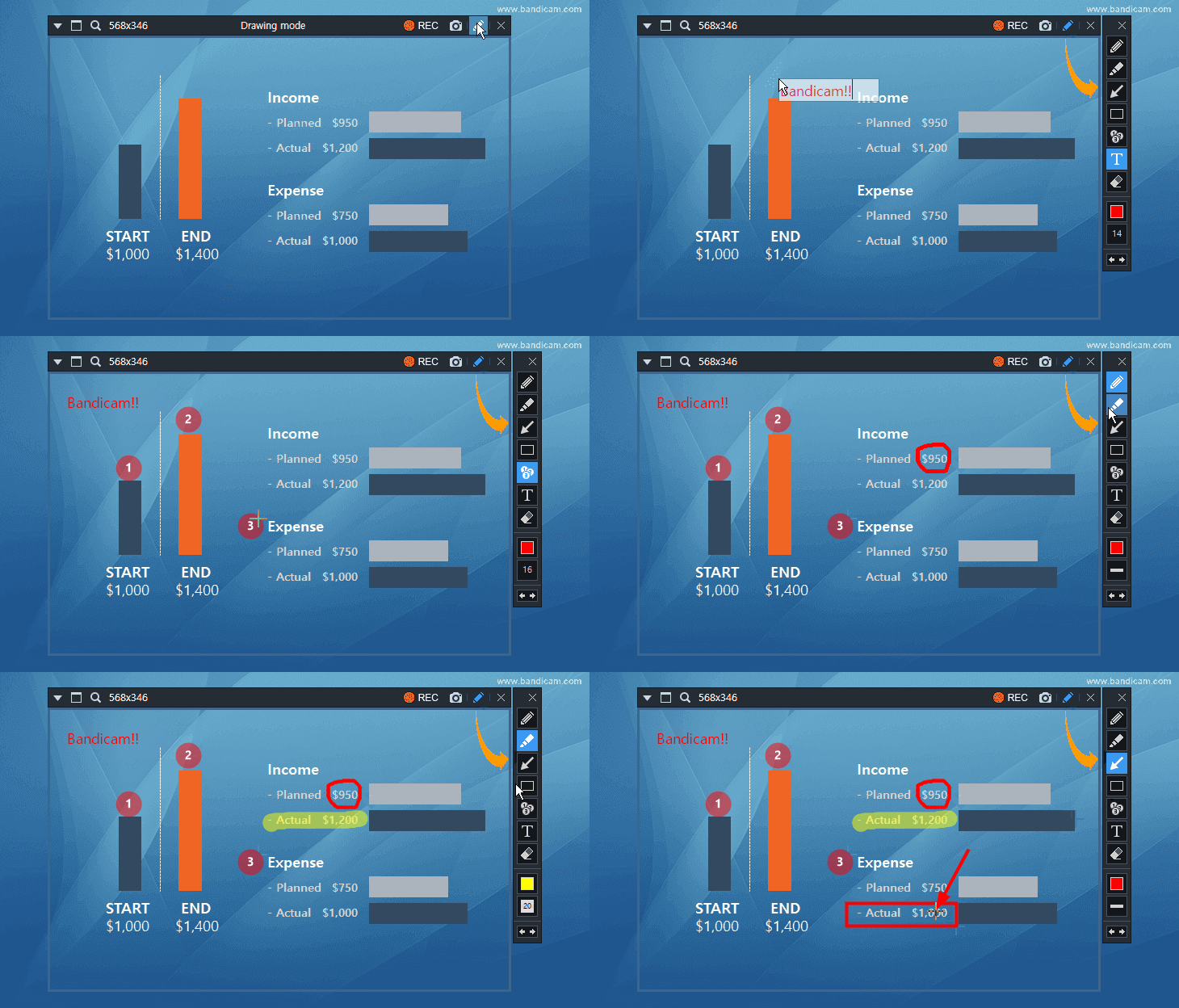
- The drawing feature can be used when capturing images.
3.3.3 03/14/2017
- Added the "Prefer RGB colorspace" option for the External codec - VFW (Video for Windows)
- Added the command line for license registration. - Registration from the setup file: bdcamsetup.exe /S /reg email serial#
- Improved the "Open output folder" function on the context menu in the Output tab.
- Improved security of Bandicam installer.
- Bandicam now doesn't allow users to enter the same preset name in the format and position/size preset settings.
- Bugs fixed
- The preset name in the format and position/size preset settings couldn't be edited/deleted.
- Specific data of large AVI files was broken (Around 150 GB or bigger files).
- Other minor bugs have been fixed.
- More changelog ›
- Registration from the program file: bdcam.exe /reg email serial#
3.3.2 02/01/2017
- NVENC encoder could not be detected on some computers when the Nvidia Geforce 378.49 driver was installed. Tip) If you use a NVIDIA graphics card and have a problem with Minecraft or other Java-based games, please download the latest GeForce driver from https://www.geforce.com/drivers.
- Other minor bugs have been fixed.
3.3.1 01/25/2017
- Bandicam is now able to save videos and images into different folders.
- Added the 'Mono' option for professional mono devices/microphones.
- Bugs fixed
- The 'Failed to initialize codec' error occurred when the NVENC codec was used on some games (Outlast).
- The Keyframe interval function of the H264 (CPU) encoder didn't work properly.
- The webcam preview function didn't work properly on some games. (GTA: San Andreas).
- Other minor bugs have been fixed.
- More changelog ›
3.3.0 11/29/2016
- Bandicam is now able to record Vulkan games/programs (Dota 2, Doom, etc.)
- Improved the DirectX 11 hooking compatibility.
- Improved the DirectX 9 hooking compatibility (PlanetSide 2).
- Improved the MJPG format compatibility with the 'Device Recording Mode'.
- Improved AMD APP H.264 codec recognition of AMD Radeon R series.
- Bandicam now supports 60FPS for webcam recording (Logitech C922 Pro).
- Bandicam now prevents the computer from sleeping while the preview window of the 'Device Recording Mode' is full screen.
- Bandicam now hides the mouse cursor if the preview window of the 'Device Recording Mode' is full screen.
- Bugs fixed
- Frames were skipped if a user set a high bitrate on AMD APP H.264 encoder.
- Bandicam stopped working when a frame was not updated in 'Screen Recording Mode' under certain conditions.
- The Keyframe interval function of NVIDIA® NVENC/HEVC encoder didn't work properly.
- Some registry entries remained after uninstallation.
- Other minor bugs have been fixed.
- More changelog ›
3.2.5 10/10/2016
- The maximum FPS has been changed from 120 to 144.
- Improved the hooking compatibility with BlueStacks.
- Improved the hooking compatibility with Forza Horizon 3.
- Bugs fixed
- Computer stopped working after hooking Windows Store apps/games under certain conditions.
- Other minor bugs have been fixed.
- More changelog ›
3.2.4 09/27/2016
- Improved the DirectX 12 hooking compatibility with AMD Radeon graphics cards.
- Bugs fixed
- The hooking function didn't work on some computers if the "Windows Store Apps (UWP)" option was checked.
- Other minor bugs have been fixed.
3.2.3 09/07/2016
- Bandicam will not hook Windows Store Apps by default.
- Improved the hooking compatibility with Origin.
- Added the "Windows Store Apps (UWP)" option.
- Other minor bugs have been fixed.
3.2.2 09/02/2016
- Bandicam couldn't hook/recognize 64 bit games randomly on Windows 7.
- The keyframe interval option wasn't applied with the H.264 (CPU) codec.
- Other minor bugs have been fixed.
3.2.1 08/19/2016
- The maximum file size for YouTube uploading has been changed from 4GB to 64GB.
- Improved the hooking compatibility with BlueStacks.
- Fixed the UI bug in the device selection window.
- Other minor bugs have been fixed.
3.2.0 08/16/2016
- It is now possible to use the 'Game Recording Mode' for Windows Store apps (UWP).
- The recorded video can now be uploaded to YouTube directly. (How to upload a video to YouTube.)
- Added support for H.264 (AMD APP) of AMD Radeon RX series.
- Improved the hooking stability of DirectX 12 games/programs.
- Improved the compatibility with AverMedia HD Capture C985 capture card.
- Improved the update module.
- Other minor bugs have been fixed.
- More changelog ›
3.1.1 06/23/2016
- Bandicam now supports the HEVC (Intel QuickSync Video) encoder.
- Added a webcam format settings function which allows users to select the webcam size, aspect ratio (16:9, 4:3) and FPS with the webcam overlay feature.
- Added a Push-To-Mute function. - It is now possible to select the Push-To-Talk or Push-To-Mute function.
- Improved the video sync between the recorded video and webcam video when a user saved webcam videos as separate files.
- Improved the compatibility of webcam overlay with DirectX 9 games/programs.
- Added a new preset (YouTube 1080p).
- Other minor bugs have been fixed.
- More changelog ›
3.1.0 05/31/2016
- Added an option, "Save webcam video as separate file (.mp4)". - Bandicam is now able to save a webcam video and game/screen video separately into two video files.
- Added a volume slider to adjust the microphone volume.
- Improved the recording performance of H.264 (CPU) encoder.
- Improved the hooking compatibility with DirectDraw games/programs (ddraw.dll).
- Improved the compatibility of webcam overlay with DirectX 9 games/programs.
- Improved the stability of uploading to Vimeo.
- Added support for H.264 (AMD APP) of R7 360/370 and FirePro series.
- Bugs fixed
- The preview window of the 'Device Recording Mode' was maximized/minimized when the image capture icon was double-clicked.
- The recording progress timer was displayed incorrectly .
- The mouse cursor on PowerPoint wasn't recorded when using a certain video resolution.
- The webcam preview function didn't work properly on the 'Need for Speed: Most Wanted' game.
- Other minor bugs have been fixed.
- More changelog ›
3.0.4 04/12/2016
- Bandicam now shows the most recently used 5 window sizes and positions in Screen Recording Mode.
- The recording will be stopped automatically if there is a problem with the video codec.
- Bandicam now displays an alert dialog when the user is trying to close Bandicam while recording.
- The registered users of Bandicam are now able to use RGB24 as default with the MagicYUV Lossless codec.
- Bugs fixed
- The webcam overlay function didn't work properly on some games. (Counter-Strike: Global Offensive).
- Failed to execute Bandicam in Windows Vista: An error occurred when users tried to start Bandicam.
- The Record button of Bandicam disappeared in certain situations.
- Other minor bugs have been fixed.
- More changelog ›
3.0.3 02/25/2016
- Bandicam now supports the fullscreen preview function in Device Recording Mode.
- Improved the AAC codec stability (Bandicam used to cut off the audio or had an audio/video sync issue on some computers.)
- Improved the external codec compatibility.
- Bugs fixed
- The recorded video had syncing problems when the user recorded for a long time on some computers.
- Bandicam had a noise problem when the AAC codec was used on some computers.
- Failed to recognize some DirectX 10 games (Company of Heroes).
- The 'Preview webcam on a screen' option didn't work when the 'Show FPS Overlay' option was unchecked in 'Game Recording' mode.
- Lossless external codec including Lagarith/MagicYUV resulted in quality loss in the registered version.
- Other minor bugs have been fixed.
- More changelog ›
3.0.2 01/21/2016
- Bandicam now supports the Deinterlacing feature in Device Recording Mode.
- The device format information is displayed in Device Recording Mode.
- The MJPEG format is available in Device Recording Mode. (Supports 1080P, 30FPS with the Logitech C920 webcam)
- Bugs fixed
- The webcam/HDMI preview was upside down in Device Recording Mode on some computers.
- Bandicam crashed when a specific audio frequency was selected in Device Recording Mode.
- Other minor bugs have been fixed.
- More changelog ›
3.0.1 12/21/2015
- Improved compatibility of Webcam device recognition.
- Added 'Aspect ratio' option menu in 'Device Recording' mode.
- Added the webcam Connecting... screen.
- Bugs fixed
- The mouse cursor was recorded in the wrong position.
- Bandicam didn't start recording in 'Screen Recording' mode on some computers.
- Other minor bugs have been fixed.
- More changelog ›
3.0.0 12/15/2015
- Added support for the Device Recording Mode. - Bandicam is now able to record an external capture device such as a Webcam, Xbox/PlayStation, Smartphone, IPTV, Capture card, etc.
- Webcam preview is displayed if the 'Add webcam overlay to video' option is checked.
- Applied new Bandicam UI design for Webcam/HDMI recording.
- Bugs fixed
- The H.264 (NVIDIA NVENC) encoder didn't work on games which use PhysX.
- Sequence number file naming of image capture didn't work properly.
- Other minor bugs have been fixed.
- More changelog ›
2.4.2 12/02/2015
- Bug fixed - FPS could not be displayed in some DirectX 11 games (Just Cause 3)
- Other minor bugs have been fixed.
- More changelog ›
2.4.1 11/10/2015, 11/12/2015
- Bandicam now supports the webcam PiP feature in DirectX 12 games/programs.
- Improved the recording stability of DirectX 12 games/applications.
- Improved the DPI-Aware compatibility when using multiple monitors.
- Other minor bugs have been fixed.
- More changelog ›
2.4.0 11/02/2015
- Bandicam is now able to record DirectX 12 games/programs.
- Bandicam now supports the Nvidia NVENC HEVC encoder. - High Efficiency Video Coding (aka. HEVC, H.265) is available with an .MP4 file type.
- Bandicam no longer supports Windows XP.
- Bugs fixed
- Sequence number file naming didn't work properly in 'Screen Recording' mode.
- Wrong area was recorded after switching from fullscreen mode to a size preset.
- Other minor bugs have been fixed.
- More changelog ›
2.3.3 09/24/2015
- Bandicam no longer supports Windows XP Service Pack 2.
- Bugs fixed
- Bandicam had a problem with the Screen Recording mode when the AAC codec was used on Windows 10.
- Bandicam had a problem with Windows Explorer on Windows XP.
- Other minor bugs have been fixed.
- More changelog ›
2.3.2 09/17/2015
- Improved the mouse cursor display method in the recorded video.
- Improved codec compatibility with the Intel QuickSync Video H.264 encoder.
- Improved codec compatibility with the Nvidia NVENC H.264 encoder.
- Improved codec compatibility with the H.264 (CPU) encoder.
- Other minor bugs have been fixed.
- More changelog ›
2.3.1 08/26/2015
- An "Intel Quick Sync Video available" window will pop up when Bandicam starts.
- Added support for H.264 (AMD APP) of FirePro series.
- Added an option, "Turn off tray notifications"
- Other minor bugs have been fixed.
- More changelog ›
2.3.0 08/11/2015
- Bandicam now supports the H.264 (CPU) encoder. - Everybody is able to use the software-based H.264 encoder.
- The recorded video can now be uploaded to Vimeo.com directly. (How to upload a video to Vimeo.)
- Bugs fixed
- FPS could not be displayed in some DirectX 11 games on Windows 10.
- Black screen problem in some games (Grand Theft Auto: San Andreas, etc.)
- The webcam overlay function in DirectX 8/9 games/programs didn't work properly on some computers.
- Other minor bugs have been fixed.
- More changelog ›
2.2.5 07/24/2015
- Bugs fixed
- Failed to recognize the AMD APP H.264 encoder on some AMD R9 graphics cards.
- Failed to initialize some codecs when a custom video size was used.
- Recorded videos were played at faster speeds when the 'Prefer CFR' option was selected.
- Other minor bugs have been fixed.
- More changelog ›
2.2.4 07/23/2015
- Failed to use the AMD APP H.264 encoder when the Catalyst 15.7 driver was installed.
- Other minor bugs have been fixed.
- More changelog ›
2.2.3 07/17/2015
- Bandicam now supports the CFR (Constant Frame Rate) option for Adobe Premiere. (What is CFR, VFR?)
- Added the Japanese language file (Bandicam is now available on Japanese Windows.)
- An NVENC available window will pop up when Bandicam starts.
- Improved the hooking compatibility with DirectX10 and DirectX11 games/programs (Toukiden: Kiwami, etc.)
- Other minor bugs have been fixed.
- More changelog ›
2.2.2 05/19/2015
- Improved the recording stop speed when the .AVI container is used.
- Fixed the failure to use the Nvidia NVENC H.264 encoder with the latest NVIDIA graphics card driver (v352.86).
- Frames are no longer dropped at the beginning of recording when the Nvidia NVENC H.264 encoder is used.
- Other minor bugs have been fixed.
- More changelog ›
2.2.1 05/06/2015
- Bandicam now supports the webcam preview function in DirectX 8 games/programs.
- Bandicam is now able to set the Webcam position precisely through Left/Right/Top/Bottom margins.
- Bandicam is now able to set the Logo position precisely through Left/Right/Top/Bottom margins.
- Full screen recording and partial 'Screen Recording' mode is switched when double-clicking on the rectangle window.
- The recording mode can be switched on the system tray.
- Other minor bugs have been fixed.
- More changelog ›
2.2.0 04/13/2015
- Added the timer recording function. - Bandicam is now able to automatically start and stop recording at a specific time.
- Added the webcam preview function. - Bandicam is now able to preview a webcam while recording in DirectX 9, 10, 11 and OpenGL games/programs.
- The splash screen (launch image) will not be displayed when Bandicam automatically starts.
- Improved compatibility with Homeworld Remastered Collection.
- Added the "Open Output Folder" menu under the rectangle window.
- Bugs fixed
- The backspace key (\) didn't work as a hotkey in some countries.
- The FPS limiter didn't work when the recording pause button was used.
- The recorded sound was only heard on the left speaker when recorded with certain microphones (Rode Podcaster, etc.)
- The size/position preset function on the rectangle window didn't work properly when using dual monitors.
- The .wav files were displayed under the video file list at the Output tab.
- Other minor bugs have been fixed.
- More changelog ›
2.1.3 02/25/2015
- Bandicam now supports naming conventions. - Users can define the output file name.
- Improved the capture method of audio devices. - Users can select more audio devices found under the Playback tab of Windows.
- Improved compatibility with the VFW (Video for Windows) codec - External codec.
- Added the splash screen (launch image) when Bandicam starts.
- Added an option, "Save as original format" with PCM audio codec in the AVI container. - Users can save multi-channel and high-definition audio (96KHz or more.)
- Other minor bugs have been fixed.
- More changelog ›
2.1.2 12/22/2014
- The minimum recording space for recording has changed from 30MB to 50MB.
- Improved compatibility with Windows 10.
- Bugs fixed
- Some information of AVI files was displayed incorrectly in the Output tab.
- MP4: Bandicam did not respond when the user recorded for a long time with the .mp4 file type.
- MP4: Bandicam had a problem with the "Two Sound Mixing" option and the .mp4 file type.
- MP4: The .mp4 files in the Output tab couldn't be deleted.
- Other minor bugs have been fixed.
- More changelog ›
2.1.1 11/26/2014
- Bandicam now supports a real-time drawing function while recording the computer screen. - Users can simultaneously draw lines, boxes, or highlights while recording in 'Screen Recording' mode.
- Added a Size Preset function which allows users to save the current target position and size in 'Screen Recording' mode.
- The recording target will be locked when the repeat image capture function is used.
- Bugs fixed
- FPS information of Some MP4 files was displayed incorrectly in the Output tab.
- Keyframe interval settings didn't work properly while using the MPEG-4 video codec.
- Other minor bugs have been fixed.
- More changelog ›
2.1.0 10/21/2014
- Bandicam now supports the .mp4 container.
- Added support for the Media Foundation AAC encoder (Windows 7 or higher)
- Added support for the AMD APP H.264 encoder (VCE) of AMD Embedded G-Series GPUs (HD 8330E/8310E/8400E/8280E)
- The "User enhanced capture method (faster, only DirectX 9)" option is unchecked by default.
- The buffer size in the blocked process list has been doubled.
- Bugs fixed
- Reduced an error while calculating the time of video frames.
- Failed to use the AMD H.264 encoder if the PC has more than 2 AMD graphics cards.
- Recording status could not be displayed well in the 'Game Recording' mode mode on some computers.
- A logo created by GIMP, a free graphic editing program, couldn't be displayed correctly.
- Other minor bugs have been fixed.
- More changelog ›
2.0.3 08/12/2014
- Added support for the webcam PiP feature (Picture-in-Picture, Video-in-Video). - The webcam stream will be recorded and merged with the main video.
- Improved codec compatibility with the Nvidia NVENC H.264 encoder.
- Improved accuracy of the FPS limit function.
- Added an option, "User enhanced capture method (faster, only DirectX 9)," for DirectX 9 games.
- Improved the animation of mouse click effects in 'Screen Recording' mode.
- Auto-complete recording can now also be configured while recording
- Bug fixed - Some DirectX 9 games caused the recorded video files to stutter.
- More changelog ›
2.0.2 07/01/2014
- Improved the recording stability of DirectX 9 games.
- Bugs fixed
- The Simple/Extended UI was switched slowly.
- Some DirectX 9 games had a delay problem when the recording start button was pressed.
- More changelog ›
2.0.1 06/23/2014
- Bandicam is now able to change the Bandicam window size (50% to 200%).
- Improved the hooking compatibility with DirectX/OpenGL games and programs.
- Improved the hooking compatibility with EA/Origin games.
- Other minor bugs have been fixed.
- More changelog ›
2.0.0 05/30/2014
- Applied new Bandicam UI design.
- Added support for Simple/Extended UI.
- Added support for the Nvidia® NVENC H.264 encoder.
- Added a new preset (H.264, 60FPS for Nvidia NVENC).
- Added the Output tab to manage the recorded video/image files.
- Added a shortcut to Bandicut for editing without losing quality.
- Added the auto start recording function. (Bandicam is now able to automatically start recording on Windows startup.)
- Added the show/hide rectangle window function/hotkey (Ctrl+Alt+H).
- Added support for multiple hotkeys (Ctrl, Shift, Alt key combinations are available.)
- Increased the dialog font size.
- Bug fixed - Delay with the repeat image capture function.
- Other minor bugs have been fixed.
- More changelog ›
1.9.5 04/23/2014
- Bug fixed - Games using DirectX 9 had a choppy/stuttering issue when SLI was enabled. (Bandicam 1.9.2 ~ 1.9.4)
- Other minor bugs have been fixed.
- More changelog ›
1.9.4 03/03/2014
- Improved the recording performance of 'Game Recording' mode.
- Improved the recording performance of 'Screen Recording' mode.
- Improved FPS recognition of 'Game Recording' mode.
- Added the Ukrainian language file by ASSASSIN-X
- Added support for AVX2 instructions.
- Bug fixed - Black screen problem in Call of Duty on some computers.
- Other minor bugs have been fixed.
- More changelog ›
1.9.3 01/21/2014
- Improved the compression ratio of H.264
- Added an option to select the GPU device for CUDA captures.
- Added an option, "Minimize to system tray"
- Bugs fixed
- Black screen problem with 'Screen Recording' mode in Windows 8 on some laptops/notebooks.
- Some video files had a seeking problem when H.264 (AMD APP) was used.
- Failed to recognize the H.264 (Quick Sync Video) encoder when dual monitors were used.
- Failed to bind/assign hotkeys on some computers.
- Miscalculated the available recording space when the output folder had been changed.
- Didn’t automatically stop the recording when the available recording space was smaller than 30MB.
- Didn’t automatically split files into 4GB parts in FAT32.
- More changelog ›
1.9.2 12/04/2013
- Improved the recording performance of 'Screen Recording' mode. (Windows 8 and above) - Added an option, "Use enhanced capture method (faster, for Windows 8 and above)".
- Improved the recording performance of DirectX 9, 10, and 11.
- Improved the recording performance of H.264 (Intel QuickSync Video, AMD APP) encoder.
- Improved FPS recognition of DirectX 11.
- Added support for H.264 (AMD APP) of Radeon R9/R7 series.
- Added a new preset (H.264, 60FPS of Intel/Nvidia/AMD).
- Added new video sizes in video format settings (1280x800, 1920x1200).
- The maximum bitrate in CBR has been changed from 20,000 kbps to 100,000 kbps.
- Added the Bosnian, Urdu, Uzbek language files.
- Many thanks to Armin Ajkunić, Farhan Khurram and Black Box00 - Bugs fixed
- Frames dropped when stereo mix or microphone was used.
- Failed to initialize AMD APP H.264 encoder when 23.976 / 29.970 / 59.940 FPS was selected.
- More changelog ›
1.9.1 10/07/2013
- Bandicam now supports the AMD APP H.264 encoder. - Tutorial: How to use the AMD VCE H.264 encoder
- Added FourCC code option (H264/X264) and Keyframe interval option (1 to 300) - Tutorial: H.264 Video Editing with Sony Vegas/Adobe Premiere
- Improved the recording performance of DirectX 9
- Improved FPS recognition of OpenGL (X-Plane 10, etc.)
- Added the Uzbek language file by Zafar94
- Bugs fixed
- The 'Run Bandicam when Windows starts' option didn't work under certain conditions.
- FPS could not be displayed in Metro 2033.
- More changelog ›
1.9.0 08/01/2013
- Bandicam now provides hardware accelerated H.264 encoder. - Nvidia CUDA H.264 encoder
- Improved the recording performance of OpenGL.
- Improved the recording performance of the Xvid encoder.
- Added an optimization option in Xvid settings.
- Bugs fixed
- Mouse flickered while recording the desktop screen.
- The thumbnail of the recorded video wasn't shown properly in Windows 7.
- More changelog ›
- Intel® Quick Sync video H.264 encoder
1.8.9 06/17/2013
- Added the Azerbaijani language file by Elvin Məlikov
- Bugs fixed
- Some video files had a problem when moving the seek bar.
- Other minor bugs have been fixed.
- More changelog ›
1.8.8 06/10/2013
- Improved the recording performance for 60 FPS.
- Improved the stability of DirectX 11 game recording.
- Added option to set the recording priority.
- Added the Croatian language file by Matko Barišić.
- Added new preset (Ultrafast setting for 60 FPS).
- More changelog ›
1.8.7 04/23/2013
- Added mouse highlight effect.
- Improved the recording performance of 'Screen Recording' mode.
- Improved the FPS display compatibility in OpenGL games/programs.
- Improved the hooking compatibility with DirectX1, DirectX7, OpenGL games/programs.
- Improved the FPS counter in DirectX/OpenGL games/programs.
- FPS number range has changed from 999 to 9999.
- Bugs fixed
- FPS could not be displayed in some DirectX 10 games (e.g., Just Cause 2)
- Two issues included recording of red FPS number, as well as a stuttering issue in some DirectX 10/11 games (e.g., Max Payne 3, Crysis3)
- Failed to play .wav file which is larger than 2GB. (Bandicam now splits the file into 2GB parts)
- Failed to record certain area of Windows 8 in full screen mode.
- Failed to hook/record when more than 2 Bandicam programs were executed at the same time.
- Coordinates of Find Window wasn't accurate in Windows Vista or higher.
- Certain mouse cursor didn't display properly.
- More changelog ›
1.8.6 02/14/2013
- Improved compatibility with VirtualDub and Avidemux.
- Added 960x540 video size in Format settings.
- Setting a new shortcut key will disable the previous shortcut key.
- MPEG-1 codec changes to Xvid automatically when recording over 2560x1600 resolution.
- Bugs fixed
- New hotkey settings not saving properly.
- GDI resource leak when a recording is paused for a long time.
- Memory overflow when using an external codec.
- Recording status could not be displayed when recording 64-bit programs with 'Game Recording' mode.
- More changelog ›
1.8.5 12/18/2012
- Bandicam now supports mouse click effects.
- Added 'Blocked process list' under the Hooking tab.
- Added the Indonesian language file by doplank
- The option, 'Enable caching on the disk', was added.
- Added Tooltip under the status bar.
- Improved the video quality when RGB24 codec is used.
- Improved compatibility with Adobe Flash Player and Acrobat Reader.
- The maximum image capture time interval has changed from 100 sec to 999 sec.
- Bugs fixed
- Delay/lag when Two Sound Mixing was unchecked in some USB microphones (Blue Yeti, Creative HS-450, Logitech G930)
- D3D9 recording bug in a certain video resolution (EVE Online, etc.)
- D3D9 recording bug in a certain game (MTGO, Magic: The Gathering, etc.)
- More changelog ›
1.8.4 10/26/2012
- Gray-colored icon located in the tray (Signifies being paused).
- Bugs fixed
- Bandicam did not respond when the game screen changed (Resizing, Alt+Tabbing, or loading a screen) in some games.
- If the user recorded continuously for several hours: an error window would pop up after clicking the Stop button.
- The 'Run Bandicam when Windows starts' option didn't work if the UAC is turned on.
- More changelog ›
1.8.3 10/12/2012
- Capture performance was improved in the DirectX 9/10/11 games - increased FPS, reduced lag.
- FPS recognition was improved in the DirectX 10 and DirectX 11 games.
- FPS limit function was improved.
- The option, 'Skip recording while frame is not updated', was added.
- If you check this option, Bandicam will not record when a frame is not updated.
- If you uncheck this option, Bandicam will record even though a frame is not updated/refreshed.
(A certain game such as Grand Chaser doesn't update the frame in a loading screen.)
- 'Others' tab was added under the 'Advanced Option' menu.
- Bugs fixed
- FPS dropped in SLI (Nvidia) or CrossFire (AMD): World of Warcraft, Battlefield 3, Guild Wars 2, and so on.
- FPS dropped after loading screen in some games.
- FPS disappeared from some games/programs.
- The first recorded video had no sound or high pitched sound (Guild Wars 2, DC Universe online, Tycoon 3 …)
- Battlefield 3 FXAA injector was not working with Bandicam.
- Stopped recording when the UAC window popped up with some computers/games.
- Some games/programs did not respond when Bandicam closed.
- The recorded video had syncing problems when Bandicam recorded for a long time.
- More changelog ›
1.8.2 09/12/2012
- Bandicam now supports the third party VFW (Video for Windows) codec - External codec
- Tutorial: Bandicam codec vs. External codec - Added User Presets
- Added 'Exit Bandicam' menu on the Rectangle window
- The Rectangle window moves/resizes faster when an arrow key is pressed
- Updated the preset of MS PowerPoint
- More changelog ›
1.8.1 07/13/2012
- Save audio tracks while recording (.wav)
- The audio is saved separately as a .wav file - Hide the ‘Rectangle window’ to the system tray
- Added the Lithuanian language file by SonicFan6124
- The minimum image capture time interval has changed from 1.0 sec to 0.1 sec
- Capturing an image is now possible every 0.1 sec. - Bugs fixed
- Failed to record in some games (World of Warcraft beta, etc.) when the ‘Set FPS limit’ option is unchecked
- Didn’t display the alert dialog when image capture failed
- Displayed incorrect format information in the Video tab
- More changelog ›
1.8.0 05/30/2012
- Improved the recording target information
- The DirectX version and video size information is displayed - Added 'Find Window' icon in Rectangle window
- Added the quick setting (Presets) function for low-end PC
- * Low-end PC settings
- Video Size: Half Size
- FPS: 15
- Video Codec: Motion JPEG
- Audio Codec: PCM
- The FPS range has changed from 5~60 to 1~120
- Added the 'Reset' button
- Improved FPS display method in DirectX 9
- Bugs fixed
- The Watermark was shown in a certain case in the registered version
- Displayed Red FPS number in a certain DirectX9 game - Railworks, Flight Simulator X
- The FPS number were miscalculated in certain DirectX9 game - Railworks: Train Simulator 2012
- Empire Earth game recording (The FPS number went after the mouse cursor in a certain DirectX7 game)
- Bejeweled game recording (DirectDraw)
- More changelog ›
1.7.9 04/25/2012
- Added the Finnish language file by Joonas Haapala
- Improved DirectX image capturing of video players which use a VMR9-Renderless method
- Bugs fixed
- FPS disappeared in a certain game (Rayman, Limbo, Command & Conquer, and Dead space)
- Recording problem in a certain video size in 'Screen Recording' mode
- Fireworks/noise problem when Two Sound Mixing was checked
- Delay/lag when Two Sound Mixing was unchecked
- Delay/lag in some games (Diablo 3)
- More changelog ›
1.7.8 04/04/2012
- Added the Vietnamese, Georgian language files.
- Many thanks to Pham Thanh Long and Giorgi Maghlakelidze - Added shutter sound when capturing images
- Added shortcut keys of Rectangle window
- Improved DirectX recording of video players which use a VMR9-Renderless method
- Improved DirectX 10/11 game recording when SMAA/FXAA is used
- Improved 'Failed to create file/Failed to start audio capture' error messages
- Improved recognition of VLC media player
- Improved UI of format settings
- Bugs fixed
- FPS was dropped massively when SLI (Scalable Link Interface) is used in DirectX 9 game
- Full screen status was reset when Bandicam restarts
- More changelog ›
1.7.7 03/09/2012
- Added the Arabic, Farsi, Swedish and Thai language files.
- Many thanks to Abbas Al-saffar, حسام محمدی, TheTrueSage and Podsatorn Suksomroop - Added the quick setting (Presets) function for PowerPoint
- Improved Hydrophobia Prophecy game recording (DirectX recording bug)
- Improved FIFA12 game recording (FPS recognition in ENB patch games)
- Improved Brink and RuneScape game recording (FPS display bug in the OpenGL game)
- Bug fixed - Two Sound Mixing bug (The mixed volume was smaller than the original one)
- More changelog ›
1.7.6 12/05/2011
- Added the Latvian, Malay and Slovenian language files
- Many thanks to Andrejs, Amirul Izzat and IvaN Navi - CPU usage optimization when Two Sound Mixing is used
- Improved AVI format compatibility (Thumbnail of the recorded video will be shown)
- Bugs fixed
- Recording didn't proceed on some computers
- Displayed the 'Ready' message when the target is not ready
- More changelog ›
1.7.5 10/21/2011
- Added Compulsory Stop function when recording target does not respond
- Improved the recording target display (Icon Display)
- Added check box for Firefox hooking control
- Bugs fixed
- FPS could not be displayed when Anti-Aliasing is used on some computers
- FPS was dropped massively when Anti-Aliasing is used on some computers
- More changelog ›
1.7.4 09/28/2011
- Added Block DirectX video overlay option
- Added the Spanish language file by Shen_Black
- Added Size option in Rectangle window
- Improved FPS recognition in ENB patch games
- Bugs fixed
- Two Sound Mixing bug on some computers (including USB headset)
- Memory Leak occurred when using MJPEG codec
- the watermark was shown on some computers at the registered version
- keep audio recording when a video has stopped in 'Game Recording' mode
- FPS limit bug fixed when you put number 1
- More changelog ›
1.7.3 09/06/2011
- Added -
- "Two Sound Mixing" option (Improved Skype recording)
- Mixing 'Primary Sound Device' and 'Secondary Sound Device' into one audio track - 'Only record Secondary Device while pushing a hotkey' option
- Usage) If you press 'Space bar' on the keyboard, you can record your voice - [ Help ] link in 'Sound setting menu' and 'Video format setting menu'
- The 'Hebrew' language file by Jabberwock
- "Two Sound Mixing" option (Improved Skype recording)
- Improved -
- Saving Function in FAT32 file system (Split files into 4GB parts in FAT32)
- FPS output method in DirectX 10 and 11
- shortcut key input method (Mouse 'R/M/X-button' input)
- overlay blocking function
- Bugs fixed
- YouTube presets (360p, 480p, 720p)
- Black/White recorded video in a certain OpenGL game (Second Life, Minecraft)
- DirectX 7 recording bug in a certain game (The Eternal City)
- Deleting Startup registry information when uninstalled
- More changelog ›
1.7.2 07/11/2011
- Added -
- The Norwegian language file by LazehPanda.
- 'Always on top' option in the rectangle window.
- 'Opacity' option in the rectangle window.
- 'Balloon help' when minimizing Bandicam.
- Automatic Saving Function when the computer sleeps.
- Improved DirectX3 and DirectX9 hooking (Duke Nukem recording).
- Improved the skin of the rectangle window.
- Bugs fixed
- 64bit DirectX recording error in 64bit Windows (Red Faction Armageddon and others)
- mouse cursor output while recording
- More changelog ›
1.7.1 06/14/2011
- Added the Bulgarian, Czech, Dutch, Italian, Polish, Portuguese, Romanian, Russian, Slovak and Turkish language files.
- Many thanks to URIEL, zdenekol, Henny, Matteo955, Perez71, Milton, Mtrix, Серёжа, PEPEK and mselmany. - Improved Find Window function of 'Screen Recording' mode.
- Enabled Screen Saver when the pause function is active.
- Bugs fixed
- recording problem in a certain game (DiRT3)
- recording position error when changing DPI (Dots Per Inch)
- More changelog ›
1.7.0 04/29/2011
- Added -
- secondary sound device (multi-audio-device supports)
- Usage: You can record both 'stereo mix' and 'microphone' at the same time - Added the German and Hungarian language files.
- Many thanks to jupiter448 and ZityiSoft - FPS number in decimal values Settings at the Format settings menu.
- auto corrupted file detect/recovery function
- hooking target selection check box and improved IE9 hooking
- a green-colored tray icon (the green-color will change to red while recording)
- auto selection of the latest recorded file
- transparent mouse cursor output (32bit)
- shortcut keys of Screen recording window
- 'Help' menu under the Target button in Bandicam
- translator display box under the Language tab
- secondary sound device (multi-audio-device supports)
- Improved -
- video quality of 'Screen Recording' mode
- anti-hacking system (file integrity check)
- Target menu when 'Record' button is not active
- OpenGL FPS display method (Improved Quake4, Doom3 FPS)
- FPS output method in DirectX 10 and 11.
- Bug fixed - an error while closing a certain game.
- More changelog ›
1.6.1 03/16/2011
- Added the French and Traditional Chinese language files.
- Many thanks to lechti64 and 蒼月 - Improved -
- DirectX 10/11 recording speed (lower memory usage).
- FPS output method in DirectX 10 and 11.
- language changing system.
- Bugs fixed
- an error while closing a certain DirectX 11 supporting game.
- recording problem in a certain video size when XviD codec was used.
- program starting error on some computers.
- recording error in 'Screen Recording' mode on some computers.
- More changelog ›
1.6.0 01/05/2011
- The pause function was added.
- Tip/Information tab was added.
- XviD MPEG-4 video codec was added.
- Overlay of the recording time on the rectangle window.
- The quick setting (Presets) function for PMP was added.
- The program (BandiFix) for recovering the corrupt recording files was added.
- Handled the resolution change for the recording of the GDI full size screen.
- The function for adjusting the FPS during the recording was improved (Solved the problem that the frame slowed down right after a game is loaded for the capturing).
- Fixed the bug that had caused some games of a certain system not to be captured in the full size screen mode.
- The video format size (1280 x 720) was added.
- Fixed the bug related to the UI for the format setting window.
- Other minor bugs have been fixed.
1.5.1 09/09/2010
- Non-compression RGB24 video codec was added
- Resolved the problem that Bandicam was blocked in the game cards of some games.
- Made a change in the presets for editing to allow the MJPEG coded to be used.
- Fixed the bug related to the setting of the location where FPS is displayed.
- Fixed the bug that had caused the abnormal operation of the Bandicam 64-bit codec for vfw (Video for Windows).
- Fixed the bug that had caused the cursor to be displayed abnormally in a certain size in 'Screen Recording' mode.
- Fixed the bug related to the custom target size in 'Screen Recording' mode.
- Other minor bugs have been fixed.
1.5.0 08/26/2010
- The function for recognizing the 'DX/OpenGL window' mode was improved.
- The function for adding a logo was added.
- Made a change to the UI for setting hotkeys.
- The function for setting the customer target size in 'Screen Recording' mode was added.
- The notification window for the setting of the stereo mix was added.
- The output function of the video file creation failure message.
- Made a correction regarding the auto-completion function.
- Fixed the bug that had caused the abnormal operation of the Win7 64-bit process recording in 'Game Recording' mode.
- Made a correction in order to disable the button for setting the "Auto-complete a recording' option, during the recording process.
- Fixed the bug that had caused errors during the D3D10/11 recording on some computers.
- Fixed the bug that had caused normal operation not to take place when there was no authority of administrator.
- Fixed the bug that had caused the audio to skip and to play fast on some computers.
- Alleviated the skipping phenomenon of the audio with a low-performance computer.
- Other minor bugs have been fixed.
1.4.2 06/11/2010
- Non-compression YV12 video codec was added
- Fixed the bug that had caused the exiting of Bandicam not to take place well.
- Fixed the bug that had caused abnormality with the function of the 'Overlay FPS' option.
- Other minor bugs have been fixed.
1.4.1 05/31/2010
- Sound device selection function was added.
- Streaming video file saving speed was enhanced.
- Sound capturing mode was improved.
- Bandi MPEG-1 decoder dependency problem was resolved.
- Fixed the bug related to the Bandi MPEG-1 decoder setup file.
- Fixed the bug related to the multi-monitor full size screen in 'Screen Recording' mode.
- Fixed the bug that had caused the existing of Bandicam in a certain size in 'Screen Recording' mode.
- Fixed the problem that the FPS could not be displayed in some D3D10/11 games.
- Other minor bugs have been fixed.
1.4.0 04/22/2010
- DirectX 11 recording function was added.
- The full size screen capturing function was added in 'Screen Recording' mode.
- The 'Find window' function for the capture area in 'Screen Recording' mode was added.
- Resolved the problem that the semi-transparent window could not be captured in 'Screen Recording' mode.
- Resolved the problem that the FPS could not be displayed in certain games that used the OpenGL technology.
- The function for allowing the FPS to be displayed on the captured video/image was added.
- Fixed the bug that had caused the setting of the extended keys such as Home key, to be shown as the setting of the Num key.
- Other minor bugs have been fixed.
1.3.8 03/11/2010
- The automatic recording completion function was added.
- The function for existing Bandicam and shutting down the system, following the automatic recording completion, was added.
- The function for restarting the recording, after the automatic recording completion, was added
- The quality of the captured JPEG image was enhanced.
- The function for creating a sub-folder during the recording was added.
- Made a change in the minimum size of the rectangle screen recording window. (128x64).
- Resolved the problem that the frame tear occurred in the MediaPlayer when the Bandi MPEG-1 codec was not installed.
- Fixed the bug related to setting the quality of video.
- Other minor bugs have been fixed.
1.3.7 02/04/2010
- The overlay output shut-off function was added.
- The size menu for 'Screen Recording' mode was added with 512x384.
- Fixed the bug that had caused the watermark to be shown under certain conditions even when the genuine Bandicam was used.
- Fixed the bug that had caused Bandicam not to work normally in Windows 2000.
- Made a change in order to restrict the minimum width/length of the recording format to 128/64.
- Other minor bugs have been fixed.
1.3.6 01/21/2010
- The option regarding whether to use WASAPI was added.
- Resolved the problem that the recording stopped when the DirectX device was reset.
- Resolved the problem that occurred when the length of the captured section in the rectangle screen recording window was a cardinal number.
- Resolved the problem that the window was closed when the Enter key was pushed after the serial number was entered at the 'Register' window.
- Resolved the problem that the audio recording was not carried out when the automatic mixer adjustment failed.
- Fixed the bug that had caused the recording to start when the focus shifted after there was a change of the hotkey.
- The output folder edit box was changed to be read-only.
- Fixed the bug which had caused the recording not to take place when 224kbps or a higher level was designated while mpeg-1 L2 and mono were for the audio condition.
- Fixed the bug that had caused the 'Record' button not to be pushed following the message for the 10-minute restriction.
- Fixed the bug that had caused the recorded video to be distorted in a certain size during the recording of OpenGL.
- Fixed the bug that caused the status updating not to take place when the recording through the rectangle on a screen failed.
- Fixed the bug related to the display of the mouse cursor during the recording through the rectangle on a screen.
- Resolved the problem that a black blank space was created during the GDI image capturing.
- Fixed the bug that had caused abnormal activities after errors occurred to the starting of the audio capturing.
- Fixed the bug that had caused the recording not to take place if there is no output folder
- Fixed the bug that had caused the errors to occur when the registration was carried out using Windows 7.
- Other minor bugs have been fixed.
1.3.5 01/05/2010
- The function for shutting off the screen saver during the recording was added.
- Fixed the bug that had caused the "capturing" status in the status bar not to change to the 'ready' status.
- Fixed the bug that had caused the watermark to be shown, depending on situations, when the recording was carried out immediately following the registration for the full product.
- Other minor bugs have been fixed.
1.3.4 12/14/2009
- Advice button function in the rectangle capturing window.
- Resolved the problem that the target was displayed as 'unknown' due to security programs, for example.
- Fixed the bug that had caused the setting of the FPD of D3D9 not to run normally.
- Fixed the bug related to the tab handling depending on the target.
- Other minor bugs have been fixed.
1.3.3 12/02/2009
- DirectX9 FPS overlay performance was improved.
- Fixed the bug related to the buffer overflow of the OpenGL capturing function.
- Other minor bugs have been fixed.
1.3.2 11/26/2009
- MJPEG encoding speed was enhanced.
- Fixed the bug related to the JPEG image storing.
- Other minor bugs have been fixed.
1.3.1 11/19/2009
- The quality of the captured JPEG image was improved.
- The hotkey for the FPS limit function was added.
- Made a change in order not to allow the rectangle window to fall outside the work area.
- Fixed the bug related to the storing of the BMP file in the rectangle area.
- Fixed the bug related to the OpenGL image capturing color.
- Other minor bugs have been fixed.
1.3.0 11/11/2009
- The rectangle area capturing mode was added (Lineage 1, and flashes, for example, can be captured).
- Handling of the errors related to the failure in the video/audio capturing.
- Made a change in order to automatically convert the alphabets in the serial number entering window into capital letters.
- Fixed the bug related to the FPS updating cycle.
- Fixed the bug that had caused some of D3D10 games not to be captured.
- Other minor bugs have been fixed.
1.2.3 10/23/2009
- MPEG-4 video encoding function was deleted.
- Made a change in order to allow the recording to take place when the hotkey for the video recording was pushed.
- Fixed the bug that had caused the DirectX10 screen not to be recognized on some computers.
- Fixed the bug that had caused the status not to be displayed well in the UAC activation system.
- Fixed the bug related to the recording time/capacity information updating interval.
- Other minor bugs have been fixed.
1.2.2 10/19/2009
- The update check function was added
- The function for displaying the recording information on the status bar was added.
- The function for displaying the recording sound level meter on the status bar was added.
- Other minor bugs have been fixed.
1.2.1 10/05/2009
- The function for recognizing the status of the hotkey for the recording was improved.
- Made a change in order to generate a message for the failure of initialization.
- Made a change in order to generate a message for the insufficient storing space.
- Made a change in order to allow the setting to be stored in the registry upon the starting of recording.
- Fixed the bug that had caused the 'Record/Stop button not to operate in 64-bit program.
- Other minor bugs have been fixed.
1.2.0 07/28/2009
- Displaying of the target and the 'Record' button was added.
- Fixed the bug related to the format setting dialogue UI.
- Fixed the bug related to the language of the setup file.
- Fixed the bug related to the setting of language.
- Other minor bugs have been fixed.
1.1.6 07/14/2009
- The recording function for various streaming videos was added.
- DirectX 1 recording function was added.
- 64-bit hooking handling was changed.
- Other minor bugs have been fixed.
1.1.5 07/08/2009
- The recording function for the Windows Media Player was added.
- Fixed the bug that had caused the recording of the Afreeca TV to stop sometimes.
- Icon was changed.
- Other minor bugs have been fixed.
1.1.4 06/30/2009
- Recording function for the streaming videos with the overlay output (Afreeca TV).
- Other minor bugs have been fixed.
1.1.3 06/25/2009
- VFW codec was added (Support for VirtualDub and Adobe Premiere).
- Fixed the bug that had caused the audio volume to be recorded a little it louder in Vista or higher.
- Other minor bugs have been fixed.
1.1.2 06/17/2009
- Fixed the bug that caused the A/V sync to go wrong when the recording was progressed for long hours.
- Other minor bugs have been fixed.
1.1.1 06/11/2009
- Resolved the problem that Bandicam did not work in some games that included Gameguard.
- Fixed the bug that had caused the FPS overlay to be shown abnormally in some games.
- Other minor bugs have been fixed.
1.1.0 06/04/2009
- Support for 64-bit games.
- The function for capturing with a mouse was added.
- DirectX 10 capturing method was improved.
- Fixed the bug that had caused the screen to be distorted during the overlay of the FPS in some games.
- Fixed the bug that had caused the image capturing not to take place in some games.
- Other minor bugs have been fixed.
1.0.4 05/14/2009
- Fixed the bug that had caused the DirectX9 based games not to be captured in some systems.
- Other minor bugs have been fixed.
1.0.3 05/11/2009
- Fixed the bug that had caused the hooking not to function normally when multiple executions are tried.
- Fixed the bug that had caused the FPS overlay not to be performed in case of OpenGL, depending on cases.
- Made a change related to the OpenGL capture.
- Other minor bugs have been fixed.
1.0.2 05/07/2009
- Support for the capturing function for the DirectX 7 based games.
- Other minor bugs have been fixed.
1.0.1 04/30/2009
- Resolved the problem that capturing did not take place in some Direct3D9 based games.
- Fixed the bug that had caused the capturing not to take place during the activation of the UAC of Vista.
- Other minor bugs have been fixed.
1.0.0 04/23/2009
- Initial distribution started.
« Go back to the Download page